Skip to content

Empty Anchor text

Hi guys!
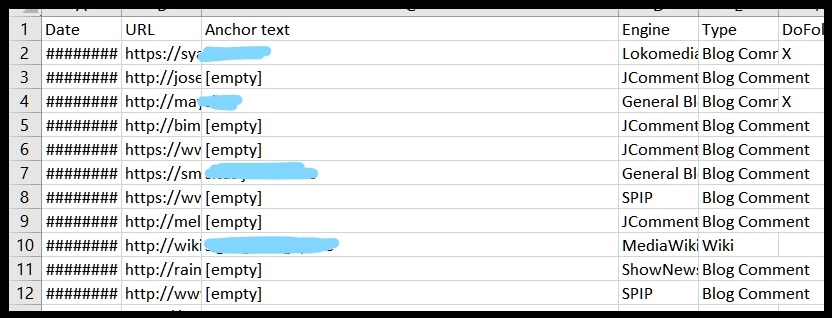
The last days i see that for some reason i get many "Empty Anchor text" on some of my Campaigns.
Is there any way to fix that and force to insert Anchor text on all my created links?

Check the pic please.
Tagged:

Comments

  • SvenSven www.GSA-Online.de
    Empty anchor texts can also come from links on images, I don't know what exactly is the case here but if you don't want this, simply disable these engines and make sure your settings do not create empty anchors.
  • NefelimNefelim
    Actually i see that all of them are coming from blog comments.
    Should i disable some of them to focus more on article links?
    Any suggestion what category of my screenshot to disable? I want to keep some blog comments but i want to create more article links.

  • SvenSven www.GSA-Online.de
    yea for a more relevant tiers you should not use comment.
  • NefelimNefelim
    The issue is that that didn't happen some weeks ago...near to all blog comments where with links&anchor texts.
    I try also to disable some of them and enable 2-3 different blog com. categories each time....same issue remains...any idea how to fix that? I really need to create blog comments with they keywords as anchor texts. 
  • SvenSven www.GSA-Online.de
    send the project backup + a sample link in pm
  • andrzejekandrzejek Polska
    Why dont you go into links you created then tell us where the anchor text is located?
  • NefelimNefelim
    Sven said:
    send the project backup + a sample link in pm
    Where to find my project backup?

  • NefelimNefelim
    andrzejek said:
    Why dont you go into links you created then tell us where the anchor text is located?
    The issue is that on the Blog Comments the anchor text is missing.

  • SvenSven www.GSA-Online.de
    right click on project->modify->backup
  • NefelimNefelim
    Sven said:
    right click on project->modify->backup
    O, ok, is this also the right way to make daily backups from all my projects in case somethngs goes wrong?

  • SvenSven www.GSA-Online.de
    either this, or you copy the whole folder under... c:\users\\appdata\roaming\gsa search engine ranker\
Sign In or Register to comment.